
Not using these 5 extensions ? — You’re killing your productivity !
Not using these 5 extensions ? — You’re killing your productivity !
I have noticed many computer science students and developers struggling with messy code in VS Code, wasting time searching through disorganized files.
This often happens because they haven’t optimized their setup with the right extensions. But don’t worry — I’m here to help you escape this chaos.
These 5 VS Code extensions will transform your coding experience, saving you time and making your workflow much more efficient.
Let’s dive in and clean up your coding space!
1 - prettier :

When working on a large project or short on time, your code can quickly become messy and hard to read. It’s frustrating — and even a bit embarrassing.
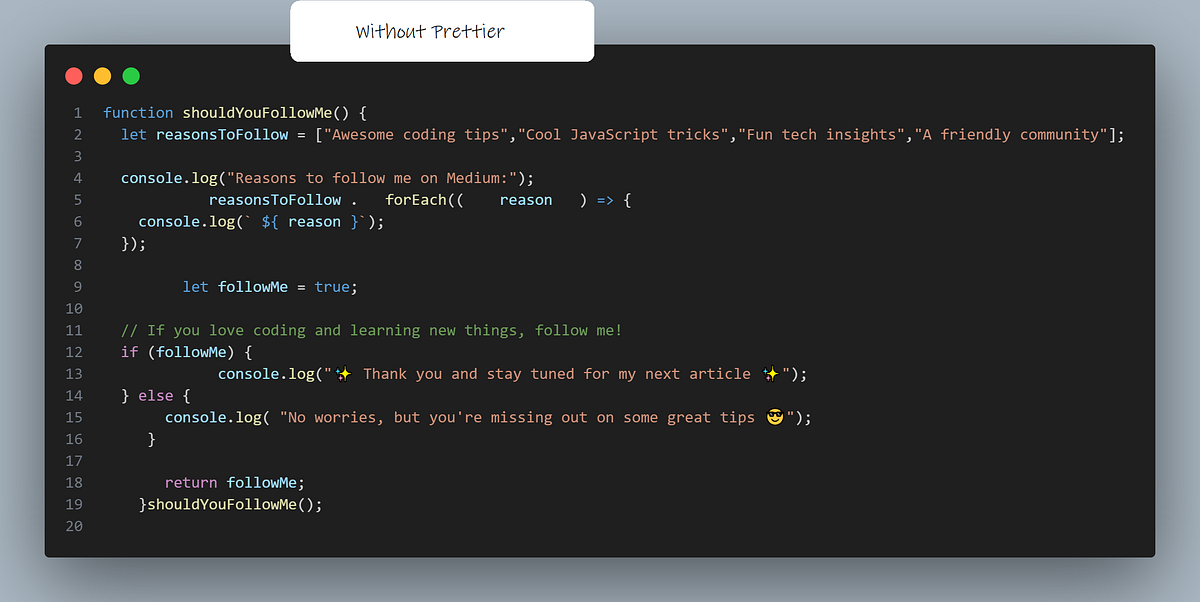
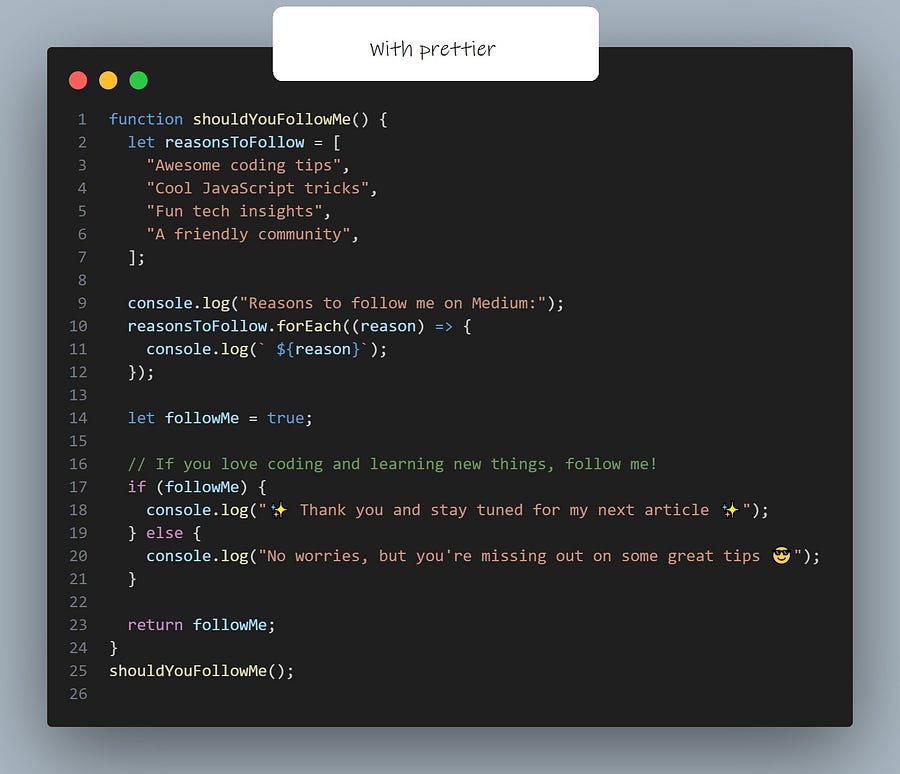
But that’s where the Prettier extension comes in. Every time you save your file (with a simple Ctrl+S), Prettier automatically formats your code,
making it clean and easy to understand. No more struggling with disorganized code — Prettier keeps everything neat for you.
Here is an example prettier on a javascript code:
2 — ESlint :

If you’re a coding with JavaScript, this extension could be a game-changer for you.
It doesn’t just assist in finding errors in your code; it actively helps you fix them, saving you countless hours of debugging and troubleshooting.
With its advanced error detection and correction capabilities, this tool ensures that your code runs smoothly and efficiently,
helping you to focus more on writing great code and less on dealing with frustrating bugs. Whether you’re a student or an experienced developer,
this extension can significantly enhance your coding workflow and improve your overall productivity.
3 — RESTclient :

Working on a project that uses an API, like a weather app that gets weather data from a weather API, this extension is really helpful. It lets you test
your API directly in VS Code, so you can send HTTP requests and see the responses without leaving your editor. This makes it easier and faster to
work with APIs, helping you to debug and interact with them more smoothly. Whether you’re checking how an API works or fixing issues,
this extension makes the whole process simpler and more efficient.
4 — Livepreview :

Live preview is a huge time-saver for developers. For example, if you’re coding a landing page, you can see your changes instantly as you code,
directly in another file within VS Code. This real-time feedback allows you to quickly spot and fix issues, experiment with design ideas, and fine-tune
your work without constantly switching between your code editor and a browser.
5 — Tabnine ai :

This AI chat extension is a powerful tool available for VS Code, offering a range of useful features to enhance your development experience.
It includes intelligent autocomplete suggestions to speed up your coding process and a chatbot assistant to help you troubleshoot issues and answer
questions. Whether you’re stuck on a problem or need quick guidance, this extension provides instant support
and boosts your productivity, making your coding sessions smoother and more efficient.
So, what about you? Are you still wrestling with messy code, or have you already discovered the magic of these extensions? Drop a comment —
let me know if you’re using these tools to level up your coding game, or if you’re still missing out.
Which ones do you rely on the most, and which ones have you ignored?
Let’s talk!